
Discord Webhook Setup for Google Forms: Channels, Mentions, and Limits
Create and protect a Discord incoming webhook for FormBeacon, suppress respondent-controlled mentions, test the saved destination, and diagnose provider errors safely.
Published · Updated · 16 min read
Configure a Discord destination without enabling mentions
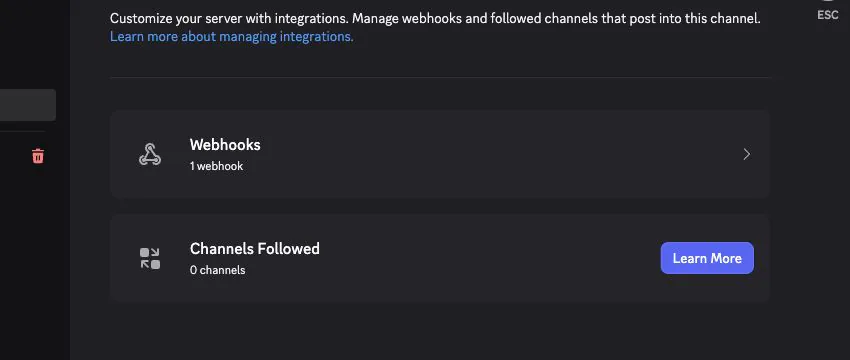
Create the webhook under Channel Settings → Integrations → Webhooks, copy it once, and keep it out of screenshots and support notes. Discord webhook resource documents the executable webhook fields and embed support. FormBeacon uses provider-controlled content types and sends restrictive mention handling so respondent text such as @everyone remains text instead of notifying a server.
- 1Save a Basic destination and send one synthetic test to a private channel.
- 2Verify the visible channel and sender, not only the HTTP response.
- 3Submit one harmless form response to prove the Google trigger path separately.
- 4Move to Rich or Advanced only on Standard or Business after Basic succeeds.
Build the Discord webhook correctly
This article focuses on the provider-side configuration that must be correct before a form notification can be trusted. Create a webhook in the exact private Discord channel, store it as a secret, and verify one synthetic message without letting response text notify users or roles.
Discord webhook resource defines incoming-webhook execution, supported content, embeds, and allowed mentions.
FormBeacon uses restrictive mention handling, treats values as text, and separates credential tests from real Google submit-trigger proof.
Use a dedicated development webhook for the supplied hiring form. A synthetic candidate such as Avery Example, application SYN-1042, keeps the visible receipt useful without exposing a real applicant, account identity, or private answer. Revoke the webhook immediately if its URL is ever shown outside the masked credential field.
Define the Discord destination before creating credentials
The practical goal is Create a webhook in the exact private Discord channel, store it as a secret, and verify one synthetic message without letting response text notify users or roles. A notification becomes useful only when a named person knows what to do after it arrives. Before changing the form, record the form owner, the destination owner, who may see the submitted information, and the action expected from the first reader.
For Discord webhook administration, keep Google Forms as the response system of record. FormBeacon delivers a notification; it is not a CRM, ticket database, applicant-tracking system, booking engine, or conditional workflow builder. If the process needs assignment state, approvals, capacity enforcement, scheduled reminders, or answer-based branching, keep those controls in a suitable system and use the message as the prompt to act.
| Decision | Record before setup | Why it matters |
|---|---|---|
| Form ownership | One durable Google account that can edit the form | The installable submit trigger belongs to the account that creates it |
| Destination | the Discord channel that owns the webhook | A technically successful delivery to the wrong room is still a privacy and operations failure |
| Audience | Only people who need the submitted data | The provider retains and displays the delivered message under its own controls |
| First action | A concrete acknowledgement, reply, review, or follow-up | Alerts without an owner quickly become background noise |
| Fallback | How the team checks Google Forms when delivery is unavailable | The notification should not become the only way to find a response |
When rehearsing Discord webhook administration, use a copied form and a private test destination. Enter obviously fictional answers. That keeps setup separate from real personal, customer, health, hiring, or payment-related information and makes it safe to repeat tests while permissions are being corrected.
Choose the exact asset, owner, and permission model
| Question | Recommended starting point | Trade-off |
|---|---|---|
| Webhook or bot? | Incoming webhook for one-way alerts | Commands and conversations require a separate bot |
| Channel audience? | Private and purpose-specific | Delivered messages are retained by Discord |
| Mentions? | Suppress all by default | Respondents must not notify a server |
| Format? | Basic first | Embeds add schema and length constraints |
1. Prepare a private sandbox channel
Limit visibility to intended testers and confirm your role can manage webhooks.
2. Create the webhook
Open Channel Settings, Integrations, and Webhooks; create a recognizable sender in the exact channel.
3. Copy and store the URL
Paste the URL directly into FormBeacon's masked credential field and never capture it in a screenshot or note.
4. Name the destination
Use a safe purpose label. The Name does not control Discord routing.
5. Start with Basic
Create a short hiring alert and include only necessary stable field variables.
6. Test mention-like text
Use synthetic values containing @everyone, @here, and role-like strings. Confirm they remain inert text.
7. Run the saved test
Verify exactly one message appears in the correct channel. Inspect visible receipt instead of trusting status alone.
8. Submit through Google Forms
Send one fictional response to prove trigger, field mapping, and delivery together.
Verify the Discord configuration in two stages
To accept Discord webhook administration, run both a saved configuration test and a real form submission because they answer different questions. The saved test checks whether the current credential, destination, and message can reach the provider. A real submission additionally checks the Google trigger, form binding, response rendering, and delivery path. Both results must succeed.
- 1Create a private test destination or tell the intended channel that a harmless test is coming.
- 2Use a copied form with short fictional values, including one blank optional answer and one value containing punctuation.
- 3Save the simplest supported mode first. Do not begin with a complex provider-specific Advanced structure.
- 4Run the destination test and confirm a harmless message in the intended Discord channel.
- 5Open the public responder view of the copied Google Form and submit it like a respondent would.
- 6Confirm that exactly one new message appears, that the form title and submission time are plausible, and that the message is visible only to the intended audience.
- 7Repeat once with a multiline answer and non-ASCII text. This catches formatting assumptions that a one-word test will miss.
- 8Return to the add-on and review the visible delivery status without pasting credentials into a support conversation.
When checking Discord webhook administration, a working saved test and a failed real submission point to trigger ownership, Google authorization, the selected form, or event eligibility. If neither works, inspect the destination credential and provider permissions first. If delivery succeeds but the content is hard to read, keep the credential unchanged and simplify the template. Changing one layer at a time preserves evidence.
| Observation | Most useful interpretation | Next check |
|---|---|---|
| Saved test fails | Provider credential, destination, configuration, or entitlement problem | Re-enter the credential privately and verify provider-side access |
| Saved test succeeds; form submission does not | Google trigger, authorization, form binding, or event problem | Reopen the add-on as the trigger owner and inspect status |
| One submission creates two messages | More than one active trigger or destination may exist | Inspect active destinations and remove duplicate trigger ownership intentionally |
| Message arrives in the wrong room | The credential points to a different destination | Create or select the credential from the exact target destination |
| Basic works; Advanced fails | The provider-specific Advanced structure is invalid | Use the provider validator and reintroduce fields one at a time |
If Discord webhook administration still fails, use the provider-by-provider Google Forms notifications diagnostic guide. Record the test time, form name, destination name, and redacted error code. Never record submitted answers or the secret itself in a shared incident note.
Diagnose Discord credential and permission failures
| Symptom | Likely cause | What to do next |
|---|---|---|
| Unknown Webhook | Webhook was removed or regenerated | Create a replacement in the exact channel |
| 403 | Channel or webhook permission no longer allows posting | Have a Discord administrator verify access |
| Saved test works, submission fails | Google authorization or trigger path failed | Refresh server-authoritative authorization context |
| Unexpected ping | Mention controls were loosened | Restore restrictive allowed mentions before retrying |
How the Discord credential is used
In Discord webhook administration, Google invokes a user-owned installable form-submit trigger after configuration. The add-on reads the submitted response, renders the selected message, and sends it to FormBeacon's delivery API. The service applies plan limits and idempotency, uses the encrypted destination configuration to call the selected provider, and stores redacted delivery metadata rather than submitted answer content or rendered notification bodies.
That architecture is the diagnostic map for Discord webhook administration. FormBeacon is not a direct browser-to-webhook shortcut, and it does operate a delivery service. At the same time, response answers do not become a searchable FormBeacon database. Google Forms remains the record you inspect or correct; the provider receives the message you explicitly send; FormBeacon retains only the bounded configuration and redacted operational data required to deliver and diagnose it.
- 1A respondent submits the Google Form and Google records the response.
- 2The verified form owner’s installable trigger runs for that submission.
- 3The add-on prepares a request containing the form and response references needed for delivery.
- 4FormBeacon validates identity, form entitlement, quota, destination configuration, and idempotency.
- 5The service calls the provider using an incoming-webhook URL created in the target Discord channel.
- 6On success, the service records redacted success metadata and counts one successful outbound destination delivery as one notification.
- 7On failure, the failed attempt does not consume the Free successful-delivery quota; an idempotent retry must not count the same delivery twice.
Before publishing Discord webhook administration, check provider behavior against Discord's webhook resource documentation, because provider interfaces, permissions, limits, and policy wording can change. Check FormBeacon's product behavior and prices on the pricing page and in the current add-on rather than inferring them from an old screenshot.
Rotate and protect the Discord credential
For Discord webhook administration, a Discord webhook URL contains the credential needed to post. Keep it out of public documents and regenerate or delete the webhook in Discord if the URL is exposed.
Every delivery created by Discord webhook administration is a new copy of the notification. Google Form sharing does not automatically restrict a Slack channel, Discord channel, Telegram group, WhatsApp recipient, or webhook receiver. Before choosing Insert all fields, review every form question and assume every destination member can read the rendered values. For sensitive workflows, send a minimal reference and instruct authorized staff to open Google Forms rather than copying all answers into a notification.
- Use the narrowest private destination that still supports the workflow.
- Remove webhook URLs, bot tokens, access tokens, and real phone numbers from screenshots and screen recordings.
- Do not submit real customer or employee data while testing.
- Review provider retention, export, moderation, and member-access settings separately from FormBeacon.
- Rotate an exposed credential at the provider, update FormBeacon, and run both tests again.
- Delete test messages that contain even fictional data if they could confuse the operational channel later.
The privacy boundary for Discord webhook administration is specific: FormBeacon encrypts channel credentials and templates with versioned AES-256-GCM keys. It does not persist form answers, rendered notification bodies, raw provider payloads, OAuth or identity tokens, or complete billing webhook payloads. Retry storage in Google document properties is limited to form ID, response ID, idempotency key, and attempt count; the response is re-read from Google for a retry.
Those controls do not automatically make every form suitable for Discord webhook administration. You remain responsible for lawful collection, notices, consent where required, access control, retention at Google and the provider, and any industry-specific rules. This article explains product behavior and operational precautions; it is not legal advice.
Provider and product boundaries
- FormBeacon does not create threads, forum posts, roles, tickets, or interactive Discord components.
- A response cannot choose the webhook, server, channel, username, or avatar.
- Webhook URLs are credentials and must stay out of screenshots, repositories, logs, and support messages.
- A successful provider response does not prove a moderator read the alert.
If Discord webhook administration requires a behavior listed here as a limit, do not hide the gap with copy or assume a future feature exists. Change the workflow, separate the forms, or choose a system that owns the missing behavior. Clear boundaries make setup and incident response easier.
Keep the first provider request deliberately simple
For Discord webhook administration, basic is the safest default. Standard and Business add Rich mode and schema-validated Advanced embeds. FormBeacon keeps respondent values as text and suppresses mentions by default.
The first message for Discord webhook administration should identify the form, state when the response was submitted, include only the information the first reader needs, and supply a stable response reference when useful. Put the action before decorative context. On a phone, the first few lines should explain why the alert matters without requiring the reader to expand a card or decode internal abbreviations.
| Format | Best use | Main risk |
|---|---|---|
| Basic | First setup, arbitrary respondent answers, incident fallback | Long forms can still create noisy messages |
| Rich | Supported emphasis, lists, quotes, code, and links on Standard or Business | Each provider supports a different safe subset |
| Advanced | Schema-validated Slack Block Kit, Discord embeds, or Telegram options | Only supported fields and variable positions are accepted |
Advanced mode in Discord webhook administration is provider-specific and schema validated. Variable substitution is context-aware and JSON safe, and respondent values remain text: they cannot become keys, object structure, credentials, destinations, template identity, or routing. Basic mode remains the most resilient choice when a workflow does not need provider-specific structure.
Configuration acceptance checklist
When completing Discord webhook administration, slow down at ownership and permissions. Open the form while signed into the account that should operate the integration. If several Google accounts appear in the browser, use a separate browser profile or private window so the account granting authorization is unambiguous. The account must be able to edit the form; a public responder link is not enough.
- 1Confirm the form title and open its editor, not its public response page.
- 2In the Google Forms editor, click the Extensions icon in the upper-left area and launch FormBeacon.
- 3Read Google's authorization screen and complete it only for the intended owner account.
- 4Open Manage FormBeacon from the add-on menu; the product uses a modal dialog rather than a permanent sidebar.
- 5Create or collect an incoming-webhook URL created in the target Discord channel using the provider's official administration interface.
- 6Paste the secret directly into FormBeacon. Do not first place it in a note, chat message, spreadsheet cell, or shell history.
- 7Choose Basic mode, use a short template, save, and send the built-in test.
- 8Submit the copied form from its responder view and compare that delivery with the saved test.
- 9Only after Basic mode works should you add more destinations, Rich mode, or a supported Advanced mode.
- 10Write down the owner and recovery procedure without writing down the secret value.
Ownership is critical to Discord webhook administration: Google installable triggers run as the account that created them, and their authorization is not automatically transferred merely because another person can edit the form. Google's current behavior is documented in Installable Triggers. If the owner changes, plan an explicit handover and test from a new response.
Finish Discord webhook administration with a one-page runbook that a colleague can follow without access to your browser history. Record the form name, intended owner, destination name, provider administrator, approved message purpose, date of the last harmless end-to-end test, and where the fallback response record lives. Record how to rotate the credential, but never record the credential value. A production-ready setup remains understandable and recoverable when the original installer is unavailable.
If Discord webhook administration uses Business workspace sharing, membership is not inferred from an email suffix. A member must be explicitly invited, the Google identity must include a verified hosted-domain claim, and that domain must exactly match the workspace. Shared connectors then let authorized workspace members reuse owner-managed destination credentials without exposing the secret value.
Separate authentication, permission, and payload errors
When Discord webhook administration fails, keep the first failing layer visible. A Google authorization or trigger failure occurs before a provider sees the message. A FormBeacon entitlement, quota, identity, or configuration error occurs before provider acceptance. A provider rejection means the request reached the provider but did not satisfy its credential, permission, payload, destination, or policy requirements. These are different problems and should not be collapsed into 'not configured.'
| Failure family | What it usually means | Safe response |
|---|---|---|
| Authorization or trigger | The operating Google identity cannot run the installed event path | Reopen as the intended owner, review authorization, and recreate only the intended trigger |
| Entitlement or limit | The selected form, destination count, format, or successful-delivery quota is outside the current plan | Compare the exact configuration with the pricing page; do not repeatedly recreate credentials |
| Authentication | The provider secret is invalid, revoked, expired, or belongs to another asset | Replace it from the provider interface and keep the old value out of logs |
| Permission or destination | The credential cannot post to the selected room, chat, number, or template | Verify provider-side membership and identifiers with a harmless test |
| Payload or policy | The provider rejected formatting, length, variables, template status, or another request rule | Return to a minimal Basic document or approved template, then add complexity one change at a time |
| Transient provider or network | A dependency was temporarily unavailable or rate constrained | Allow bounded idempotent retry; do not create duplicate destinations or submit real responses repeatedly |
When escalating a problem with Discord webhook administration, provide the form's non-sensitive name, provider, approximate time with timezone, whether the saved test worked, whether a real submission worked, and the stable visible error code. Redact answers, webhook URLs, tokens, Meta identifiers that are treated as private in your organization, screenshots of personal data, and complete request or webhook bodies.
Account for destination and plan limits
Before launching Discord webhook administration, match it to the pricing contract. Free supports one form, one active Basic destination on Slack, Discord, or Telegram, and 100 successful outbound destination deliveries per UTC calendar month. Standard supports up to 10 forms and Basic, Rich, and supported Advanced modes on Slack, Discord, and Telegram. Business adds WhatsApp approved templates, Webhook JSON, a shared 100-form workspace capacity, shared connectors, and unlimited explicitly invited workspace members.
For quota accounting in Discord webhook administration, one notification is one successful delivery to one outbound destination. If one response is sent to three active destinations and all three succeed, that is three successful deliveries. A failed delivery does not consume the Free quota, and an idempotent retry of the same delivery must not count twice. The Free counter resets lazily when the UTC month key changes; there is no reset cron to wait for.
Multiple destinations attached to Discord webhook administration use fan-out, not conditional routing. Every active destination on the form receives every eligible response. FormBeacon does not inspect an answer and select a destination, severity color, owner, or template branch. To keep different audiences separate, use separate forms or a workflow system that explicitly implements rules, and test that system with representative data.
Verify current FormBeacon amounts and included features for Discord webhook administration on the pricing page. Product prices and provider charges are different: Meta or another provider may apply its own usage charges, taxes, or policies, and those charges are not replaced by a FormBeacon subscription.
Document ownership, rotation, and recovery
Treat Discord webhook administration like a small operational system. Name a form owner and a destination owner, document the purpose without recording secrets, and schedule a periodic harmless submission. Retest after changing form ownership, Google authorization, questions, destination membership, channel structure, webhook or bot settings, Meta templates, or the FormBeacon plan.
- Keep a copy of the intended message structure without any credential or real response data.
- Review whether every destination member still needs access to the notification content.
- Remove unused destinations before creating new ones so fan-out remains understandable.
- Use provider audit or administration features to investigate credential changes where available.
- When an owner leaves, deliberately transfer the Google Form and recreate or verify the user-owned trigger under the intended owner.
- During an incident, preserve timestamps and stable error codes, but redact identities, credentials, answers, and complete payloads.
The fallback for Discord webhook administration should remain visible: authorized staff can open Google Forms and inspect responses when chat delivery is delayed. Do not delete or mutate a form response simply because a notification failed. Repair the delivery path, make a harmless test, and use the response reference to reconcile operational action without copying the original answers into troubleshooting logs.
Frequently asked questions
- Does FormBeacon store submitted answers?
- No. FormBeacon does not persist answers, rendered messages, or raw provider payloads. Google Forms remains the response record; providers retain messages they accept under their own controls.
- How are Google Form fields mapped?
- The variable picker stores the stable Google item ID. Renaming a question or giving two items the same title does not redirect a saved variable to another field.
- Can an answer choose a destination or credential?
- No. Respondent values remain text and cannot control credentials, endpoints, recipients, object structure, template identity, or routing.
- Do I need a Discord bot?
- No. A channel webhook is enough for FormBeacon's one-way notifications. Bot commands and interactions are outside this integration.
Set this up on your own form
Follow the installation guide to install the add-on, connect a destination and send a test alert. FormBeacon does not persist form answers or rendered notification bodies.